Back
How to Get a Google Knowledge Panel: The Complete Guide
A step-by-step guide to getting a Google Knowledge Panel. Learn exactly what it takes — or let us handle the whole thing for you.
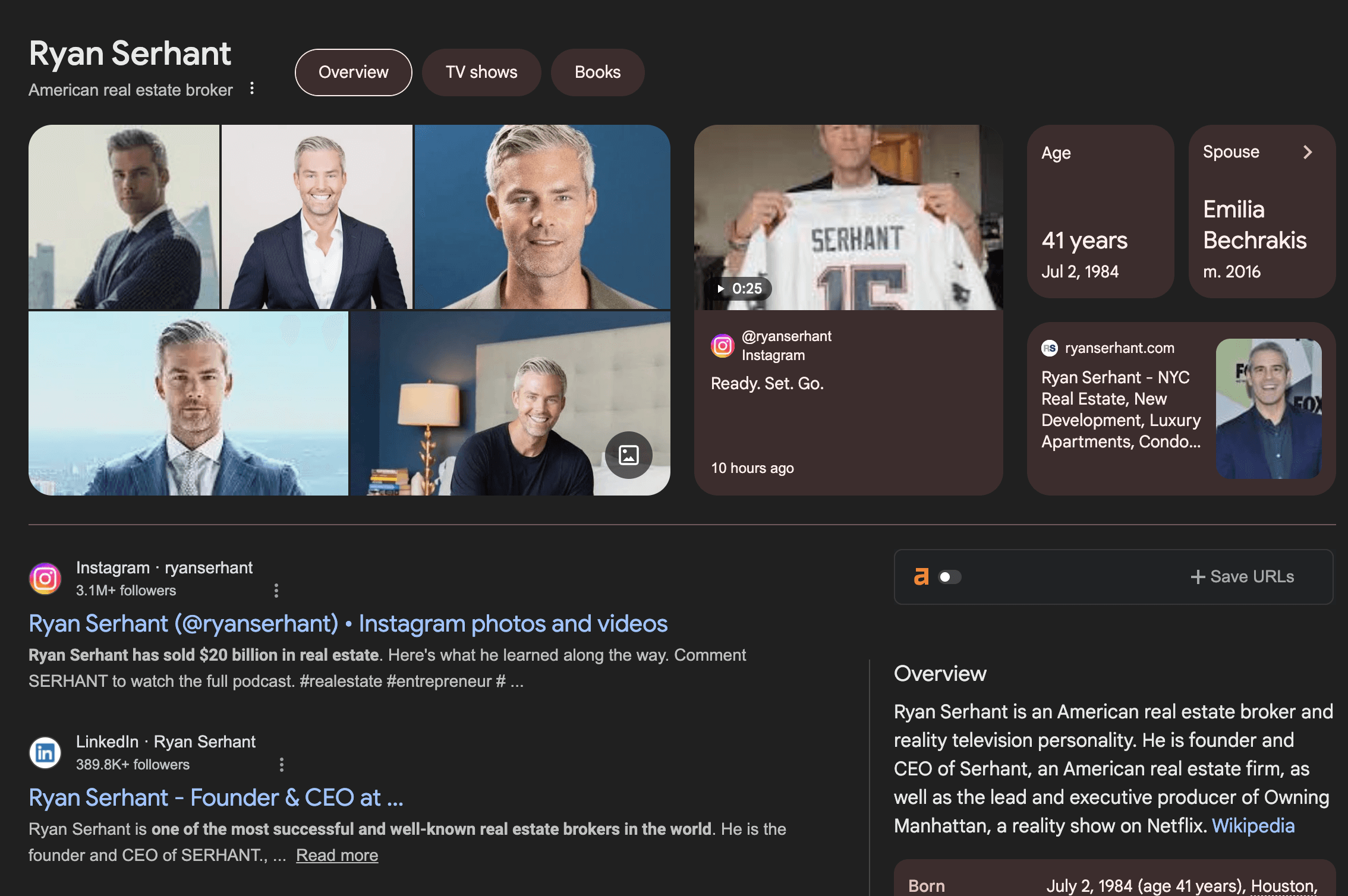
If you have ever Googled a CEO, a bestselling author, or a public figure, you have seen the info box that appears on the right side of the search results. That is a Google Knowledge Panel. It shows a photo, a short bio, key credentials, social links, and related information - all verified and curated by Google.
It is, in practical terms, Google telling the world that this person is notable, verified, and worth knowing about.
And it is not reserved for celebrities. Entrepreneurs, executives, consultants, coaches, creators, doctors, lawyers, and professionals across every industry are getting Knowledge Panels. The question is not whether you can get one. It is whether you are willing to do the work.
This guide walks you through every step. We will be honest about what it takes, because we do this professionally for clients and we have seen what works, what fails, and what gets people flagged by Google.
Step 1: Understand What Google Actually Wants
Google does not hand out Knowledge Panels as favors. The panel appears when Google’s Knowledge Graph - its massive database of entities and relationships - has enough confidence that you are a distinct, notable entity.
That confidence comes from three things:
Corroboration. Multiple independent, authoritative sources confirm the same facts about you. Your name, your role, your affiliations. If your LinkedIn says one thing, your website says another, and a press article says a third, Google is confused and will not create a panel.
Authority. The sources confirming you need to be sources Google trusts. Wikipedia, major news outlets, industry publications, established databases. A self-published blog post does not carry the same weight as a feature in Forbes or a Wikipedia entry.
Structured data. Google reads structured data (Schema markup) on websites to understand entities. If your website tells Google you are a Person, with a specific role, at a specific organization, connected to specific social profiles, that signal matters.
Step 2: Audit Your Current Online Presence
Before you build anything, you need to see what Google currently sees. Search your full name in an incognito browser window. Note:
Does a Knowledge Panel already exist? (If yes, skip to claiming it)
What appears on page one? LinkedIn? Personal website? News articles? Nothing?
Are there other people with your exact name? (This is a name collision problem and makes everything harder)
Is the information consistent across all results? Same name spelling, same job title, same company?
If your search results are thin, inconsistent, or dominated by someone else with your name, you have some groundwork to do before a panel is even possible.
Step 3: Establish Your Entity Home
Your entity home is the single webpage that Google considers the primary source of truth about you. For most professionals, this is your About page on your personal website, or your homepage if the site is about you specifically.
This page needs:
Your full name in the H1 tag
A professional bio covering who you are, what you do, your key credentials, and your affiliations
Links to your social profiles (LinkedIn, Twitter/X, Instagram, YouTube)
A high-quality headshot
Schema markup (Person schema) with your name, job title, affiliated organization, social links, and image
The Schema markup is where most people get stuck. It is not something you can see on the page. It is code embedded in the HTML that talks directly to Google. If you are not comfortable editing code, this is the first point where doing it yourself gets technical.
Step 4: Standardize Every Profile
Google cross-references information across platforms. If your LinkedIn says you are "CEO at Acme Corp" but your Twitter bio says "Founder, Acme" and your website says "Managing Director, Acme Corporation," Google sees three different signals and gets confused.
You need to go through every platform and make sure the following are identical:
Your name (exact same spelling, no abbreviations on some and full names on others)
Your title/role
Your company or organization
Your bio (does not need to be identical, but the facts must match)
Your profile photo (same photo across platforms helps Google connect the dots)
Platforms to standardize: LinkedIn, Twitter/X, Instagram, Facebook, YouTube, Crunchbase, Bloomberg (if applicable), your personal website, your company website bio page, any industry directories, podcast guest profiles, speaker bios on event pages.
This sounds simple. In practice, most people have 15–25 profiles that need updating. It takes hours, not minutes. And missing even a few can delay or prevent the panel.
Step 5: Get a Wikidata Entry
Wikidata is the structured data backbone of Wikipedia. You do not need a Wikipedia page to get a Knowledge Panel (a common myth), but you do need a Wikidata entry.
Creating a Wikidata item for yourself requires:
An account on wikidata.org
Adding claims (structured facts) about yourself: name, date of birth, occupation, employer, official website, social media links
Sourcing every claim with a reference (this is where it gets tricky — self-published sources are often rejected)
The problem: Wikidata has community editors who may challenge or delete your entry if they do not consider you notable enough. If your entry gets deleted, it actually hurts your chances of getting a panel because Google now has a negative signal.
This is one of the highest-risk steps in the DIY process. Getting it wrong can set you back months.
Step 6: Build Press and Authoritative Mentions
Google needs third-party, independent sources confirming who you are. The best signals come from:
News articles in publications Google trusts (major outlets, industry publications)
Interviews, podcast features, or guest articles where your name and credentials are mentioned
Industry databases (Crunchbase for founders, IMDB for media professionals, etc.)
Professional association listings
The catch: you cannot just write a press release and publish it on a wire service. Google has gotten very good at identifying PR-only mentions versus genuine editorial coverage. One real feature in an industry publication is worth more than twenty press releases.
Building real press takes time, relationships, and usually money (a PR agency or publicist). This single step can cost $3,000–10,000+ on its own if you hire help, and months if you try to earn coverage organically.
Step 7: Implement Technical SEO Signals
Beyond Schema markup on your entity home, you need:
SameAs properties in your Schema pointing to all your verified profiles
Consistent NAP (Name, Address, Phone) across all business listings if applicable
Google Search Console verified for your website
Proper crawlability (no noindex on your key pages)
Sitelinks search box markup if applicable
If terms like "sameAs properties" and "NAP consistency" made your eyes glaze over, that is the point. This is technical work. It is not hard for someone who does it every day, but it is a steep learning curve if you have never touched structured data before.
Step 8: Wait (And Hope)
Here is the part nobody likes hearing: even after you do everything right, there is no guaranteed timeline. Google recrawls and reprocesses entities on its own schedule. For some people, a panel appears in 4–6 weeks. For others, it takes 6–12 months. Some people do everything in this guide and still never get one because of name collision issues or insufficient authority signals.
And if you used any shortcuts along the way — spammy link building, fake press, purchased Wikipedia edits — Google may trigger a panel briefly and then delete it. Once a panel is flagged and deleted, rebuilding it is dramatically harder than building it from scratch.
The Summary
FACTOR | DIY | PROFESSIONAL SERVICE |
Time investment | 40–100+ hours over 3–12 months | Your time: 1 hour. |
Technical skill required | Schema markup, Wikidata editing, SEO fundamentals, PR strategy | None. We do all the technical work. |
Risk of failure | Moderate to high. One misstep can set you back months. | Very low. We have done this 350+ times. |
Risk of spam flagging | High if you take shortcuts or hire cheap help | Near zero. We use only legitimate methods. |
Cost | Free (your time) to $10,000+ (hiring PR, Wikidata editors, etc. separately) | One-time payment. Everything included. |
Timeline to panel | 3–12 months if it works | 30–90 days for most clients |
We wrote this guide because we believe in transparency. You should know exactly what goes into getting a Knowledge Panel. And now that you do, you can decide: invest months of your own time and take on the risk yourself, or let us handle it with a guarantee.
Ready to skip the hassle? Book a Strategy Call.

Abhay Jain

Founder and CEO
Abhay Jain is the Founder and CEO of Lindy GEO and Lindy Panels.
Most people build a following. Few build a name that outlasts them.
Claim the most valuable digital real estate on the internet and prove you’ve built something designed to stand the test of time.
Latest posts
Discover other pieces of writing in our blog